The New Lincoln App: How To Enter Your Preferred Dealer?
The Digital Extension of Lincoln Luxury The Lincoln app represents a significant advancement in how owners connect with their vehicles and the brand. This comprehensive mobile application serves as a digital extension of the Lincoln ownership experience, offering convenient access to vehicle information, remote controls, and personalized services. One essential function of the app is […]
The Digital Extension of Lincoln Luxury
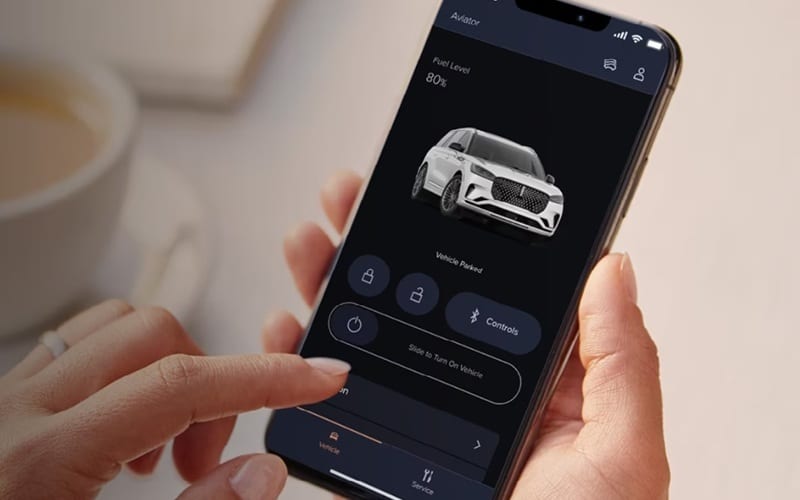
The Lincoln app represents a significant advancement in how owners connect with their vehicles and the brand. This comprehensive mobile application serves as a digital extension of the Lincoln ownership experience, offering convenient access to vehicle information, remote controls, and personalized services. One essential function of the app is the ability to select and save your preferred Lincoln dealer—a feature that streamlines service scheduling, enables customized offers, and creates a direct communication channel with your chosen dealership.
Why Select a Preferred Dealer in the Lincoln App?
Personalized Service Experience
Setting your preferred dealer in the Lincoln app creates a seamless connection between you and your chosen Lincoln retailer. This connection transforms routine vehicle maintenance into an effortless experience tailored to your needs and schedule. The app remembers your preferences, vehicle details, and service history, eliminating the need to provide this information repeatedly.
Streamlined Communication
With a preferred dealer selected, all service-related communications flow through a consistent channel. Whether scheduling maintenance, receiving service reminders, or accessing special offers, your interactions remain focused through your chosen dealership. This streamlined approach saves time and reduces the confusion of managing multiple service relationships.
Enhanced Loyalty Benefits
Your preferred dealer becomes your primary point of contact for Lincoln Access Rewards™, the brand’s loyalty program. This connection ensures you receive appropriate recognition for your loyalty and maximizes opportunities to earn and redeem points for services, accessories, and future vehicle purchases.
Step-by-Step: How to Enter Your Preferred Dealer
Download and Set Up the Lincoln App
Before you can select a preferred dealer, you need to have the Lincoln app installed and properly configured:
1. Download the Lincoln app from your device’s app store
* Available for both iOS and Android platforms
* Search for “Lincoln” in the app store
* Verify the app developer is “Lincoln Motor Company”
2. Create or sign in to your Lincoln account
* New users will need to create an account with a valid email address
* Existing owners can sign in with their owner account credentials
* Follow the on-screen prompts to complete account verification
3. Add your vehicle to your profile
* Enter your Vehicle Identification Number (VIN)
* Confirm your vehicle details are correct
* Allow the app to connect to your vehicle (if equipped with Lincoln Connect™)
Enter Your Preferred Dealer
Once your account is set up and your vehicle is registered, you can designate your preferred dealer through these steps:
1. Open the Lincoln app and sign in to your account
2. Navigate to the Profile or Settings section
* Look for the menu icon (typically three horizontal lines) in the upper corner of the screen
* Tap “Profile,” “Account,” or “Settings” depending on the app version
3. Locate the Dealer Preferences option
* Scroll through the settings menu until you find “Dealer Preferences” or “Preferred Dealer”
* This option may also appear under “Service Settings” in some versions of the app
4. Search for and select your dealer
* Tap the search field and enter your postal code or city
* Browse the list of authorized dealers in your area
* Select your preferred dealer from the search results
5. Confirm your selection
* Review the dealer information to ensure it’s correct
* Tap “Set as Preferred Dealer” or “Save” to confirm your choice
* The app may ask for additional confirmation before finalizing your selection
Verifying Your Preferred Dealer Selection
After selecting your preferred dealer, it’s important to verify the setting was properly saved:
1. Return to the main menu of the Lincoln app
2. Navigate to the Service or Maintenance section
3. Look for your dealer information displayed at the top of the screen
4. Confirm the correct dealer name and contact information appears
5. If needed, tap the dealer name to view additional details or make changes
Make the Most of Your Preferred Dealer Connection
Schedule Service Through the App
With your preferred dealer selected, scheduling service becomes remarkably simple:
1. From the app’s main menu, tap “Service” or “Schedule Service”
2. Select the type of service needed
* Regular maintenance
* Specific repairs or concerns
* Warranty service
3. Choose your preferred date and time
4. Add any notes about your vehicle’s condition or special requests
5. Review and confirm your appointment details
6. Receive confirmation directly from your preferred dealer
Lincoln Pickup & Delivery Service
One of the most valuable benefits of setting a preferred dealer is access to the signature Lincoln Pickup & Delivery service:
* Schedule service through the app with your preferred dealer
* A service valet will come to your home or office
* Your vehicle will be picked up, and a courtesy vehicle left in its place
* Once service is complete, your vehicle will be returned to you
* The entire process is trackable through the Lincoln app
This complimentary service is available for Lincoln vehicles within the 4-year/50,000-kilometre new-vehicle limited warranty period, making maintenance completely effortless.
How to Change Preferred Dealer Settings
Common Issues and Solutions
If you encounter difficulties setting your preferred dealer, try these solutions:
App not showing dealer options:
* Ensure your app is updated to the latest version
* Sign out completely and sign back in
* Verify your vehicle is properly registered to your account
Cannot find your dealer:
* Try searching by postal code instead of city name
* Expand your search radius in the app settings
* Contact Lincoln Concierge for assistance locating your dealer
Preferred dealer not saving:
* Check your internet connection
* Clear the app cache and try again
* Uninstall and reinstall the app if problems persist
Contact Lincoln Support
If you need additional assistance with the Lincoln app or preferred dealer settings:
* Use the “Contact Us” or “Help” section within the app
* Call Lincoln Concierge for personalized support
* Visit your local retailer for in-person assistance
Additional Benefits of the Lincoln App
Remote Vehicle Control
The Lincoln app provides comprehensive remote control of your vehicle:
* Remote start and stop the engine
* Lock and unlock doors
* Schedule remote starts for regular departure times
* Check vehicle status, including fuel level and range
* Locate your vehicle in crowded parking areas
These features are complimentary with Lincoln Connect™, which is standard on select models.
Vehicle Health Reports
Stay informed about your SUV’s condition with detailed health reports:
* View comprehensive diagnostics
* Monitor oil life and other vital fluids
* Receive maintenance alerts and recommendations
* Track service history in one convenient location
Lincoln Access Rewards™
The Lincoln loyalty program integrates seamlessly with your preferred dealer selection:
* Earn points for service visits at your preferred dealer
* Receive special offers and promotions
* Redeem points for service, accessories, or toward your next vehicle
* Track and manage your rewards directly through the app
The Future of Lincoln Digital Services
Continuous Improvements
The app regularly receives updates to enhance functionality and add new features:
* User interface refinements for easier navigation
* Additional service scheduling options
* Enhanced vehicle monitoring capabilities
* Expanded reward opportunities
Lincoln Enhance Software Updates
Many newer models can receive over-the-air software updates scheduled through the app:
* Set update preferences and schedules
* Receive notifications when updates are available
* Track the progress of ongoing updates
* Enjoy new features without visiting the dealership
Lincoln App: Streamlined Luxury Through Digital Connection
Setting your preferred dealer in the Lincoln app transforms your ownership experience by creating a direct, personalized connection to your chosen Lincoln retailer. This simple step unlocks a range of benefits that save time, reduce hassle, and ensure your vehicle receives the expert care it deserves.
The process takes only minutes to complete but delivers years of streamlined service experiences. From effortless scheduling to the signature Lincoln Pickup & Delivery service, your preferred dealer becomes an essential partner in your ownership journey.
Download the Lincoln app today, select your preferred dealer, and experience the next level of ownership—where luxury extends beyond your vehicle to every interaction with the brand and your chosen dealership.
Disclaimer: Content contained in this post is for informational purposes only and may include features and options from US or international models. Please contact the dealership for more information or to confirm vehicle, feature availability.