How Does the Lincoln App Track Service and Dealer Information?
If you use the Lincoln app to manage your vehicle, you can expect it to show your preferred retailer, service appointments, and a complete maintenance record. The app does provide these functions, but the information displayed depends on how the vehicle is associated with your Lincoln Account and where the service was performed. The key […]
If you use the Lincoln app to manage your vehicle, you can expect it to show your preferred retailer, service appointments, and a complete maintenance record. The app does provide these functions, but the information displayed depends on how the vehicle is associated with your Lincoln Account and where the service was performed.
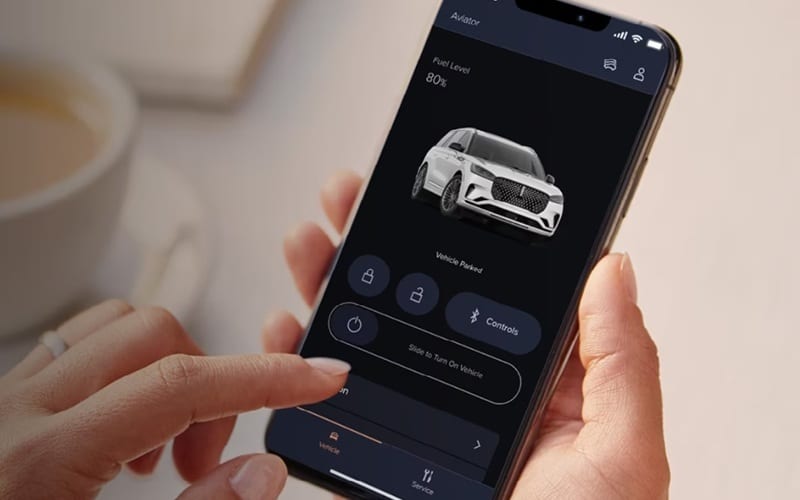
The key distinction is that the Lincoln app does not automatically create a complete record of every service performed anywhere. Lincoln Canada states that service history shown in the app comes from participating Lincoln Retailers, and not every retailer participates in sharing service records.
How the Lincoln App Handles Service Information
The Lincoln app connects your vehicle to your Lincoln Account and provides access to several ownership-related functions. Depending on the vehicle and available services, these can include vehicle health information, maintenance information, service history and service scheduling. For service history specifically, Lincoln Canada explains that you can view records from participating Lincoln Retailers through the app.
To access them:
- Log in to the Lincoln app.
- Select the vehicle you want to review if you have more than one vehicle.
- Select the tool icon to open the Service dashboard.
- Select Service History.
The app displays available records chronologically, with the latest service information first. This makes the app useful for checking previous maintenance without keeping every service invoice in a separate location.
What Service Records Appear in the Lincoln App?
Several conditions determine what appears in the service history. According to Lincoln Canada, only services performed by a Lincoln-authorized retailer are eligible to appear in the customer’s service history, and not all retailers share service records. That means a missing service entry doesn’t necessarily mean the service was never performed.
For example, if maintenance was performed outside the participating Lincoln retailer network, that work may not transfer to the Lincoln app service history. A short delay can also occur before a recently completed service appears in the app.
How Does the App Track Your Preferred Lincoln Dealer?
The Lincoln app also allows you to select a preferred Lincoln Retailer.
The Lincoln Canadian app information describes the dealer functionality as a way to search for retailers, select a preferred dealer and access information such as service hours and available services.
Once a preferred retailer is selected, the app can make it easier to:
- Find the retailer’s information
- View service hours
- Schedule service
- Get directions
- Contact the retailer
- Access available dealer services
The preferred retailer is therefore more than simply a location saved on a map. It helps determine which retailer information the app shows you when you use its service-related functions.
Why Does the App Need a Preferred Dealer?
A preferred dealer gives the Lincoln app a specific retailer to associate with your service needs. This is particularly useful when you want to schedule maintenance or contact a retailer. Rather than searching through all available Lincoln Retailers each time, the app can use the retailer you’ve selected.
However, selecting a preferred dealer does not mean that every service performed at that location will necessarily appear instantly in your history. Service-record availability still depends on whether the retailer participates in the Lincoln service-record sharing system.
Does the Lincoln App Show the Complete Service History?
Not necessarily. This is one of the most important points when interpreting the service information in the Lincoln app.
Lincoln Canada specifically states that:
- Only the primary owner can view the vehicle’s service history in the app.
- Secondary vehicle owners and secondary users cannot view the service history.
- Only services performed by a participating Lincoln-authorized retailer appear.
- Some records may take a short time to become available.
Therefore, view the app as a digital record of eligible service information, not a guaranteed database of every maintenance event in the vehicle’s history.
What If a Service Visit Is Missing?
If a recent service visit doesn’t appear, check a few basics before assuming the record is unavailable.
1. Check that the correct vehicle is selected
If multiple vehicles are associated with your Lincoln Account, make sure you are viewing the service history for the correct vehicle.
2. Confirm that you are the primary owner
Lincoln Canada states that the app makes service history available only to the primary owner.
3. Allow time for a recent service record
Lincoln notes that service records may take a short time to appear.
4. Consider where the service was performed
A service performed by a retailer that does not participate in service-record sharing may not appear in the app.
5. Check the preferred retailer
If you are scheduling future maintenance, verify that you selected the appropriate Lincoln Retailer as your preferred dealer.
Can the Lincoln App Show More Than Service History?
Yes. The Lincoln app combines service information with other vehicle and ownership functions. Lincoln Canada currently describes features that include vehicle health information, fuel level, oil information, tire pressure, and service history. Depending on the vehicle and available connected services, the app can also provide remote vehicle functions.
The app can also provide access to recalls and Customer Satisfaction Programs through the Service dashboard. To check them, Lincoln instructs users to open the Service screen and select the relevant section under the Service Schedule. This means the app can serve as a central hub for several aspects of vehicle ownership, not just maintenance records.
What Information Does the Dealer Side Provide?
Dealer information is handled separately from the vehicle’s service history. The Lincoln dealer search allows you to find retailers by location and view information such as hours and services offered.
Once you select a retailer, its dealer details can include sales and service information, directions, contact options, and links to dealer websites. This distinction matters because dealer information and vehicle service records are related but not the same. Choosing a preferred retailer does not itself create a service record.
What Should You Expect From the Lincoln App?
The simplest way to understand the system is:
Your Lincoln Account → Your vehicle → Service dashboard → Service history
The app then displays eligible service records associated with that vehicle.
For dealer information, the process is different:
Lincoln App → Dealer search → Select preferred Lincoln Retailer → Access dealer and service information
These two functions work together to make service management easier, but they use different sources and have different requirements.
Stay Connected with the Lincoln App
The Lincoln app tracks service and dealer information through your Lincoln Account, your associated vehicle and participating Lincoln Retailers. You can view eligible service records in the Service History section, and the app also lets you select a preferred Lincoln Retailer and access its service information.
The key limitation is that the app may not include every service performed on the vehicle. Lincoln Canada states that only services performed by participating Lincoln-authorized retailers appear, and there may be a delay before new records appear.
So, if you’re using the Lincoln app to track your vehicle’s maintenance, it is a useful digital service record, but the information shown depends on the vehicle account, ownership status, retailer participation, and timing of the service record.
Disclaimer: Content contained in this post is for informational purposes only and may include features and options from US or internacional models. Please contact the dealership for more information or to confirm vehicle, feature availability.